Stop being the
operating system.
Seven builders that give your AI somewhere to remember how you work... so it stops asking, and starts already knowing.
smarter with every use.
$147 one time · instant access · gets smarter every use
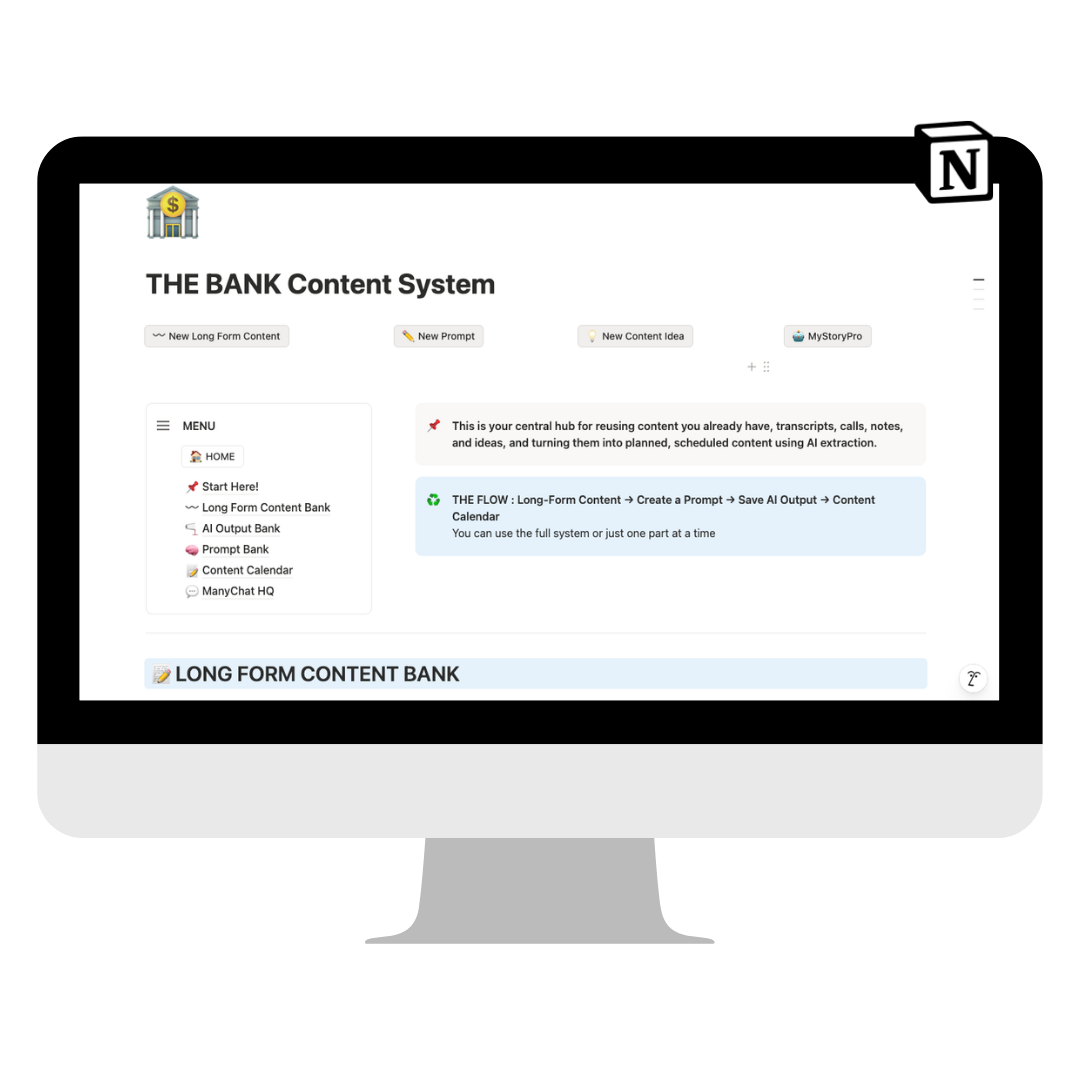
The reason AI keeps underdelivering for you isn’t the model. It’s that nothing around it remembers anything. The DIY Toolkit gives it somewhere to write it down.
Does This Sound Familiar?
→ You open your AI, and the first four minutes are you answering the same questions about your business. Again. You have typed some version of that paragraph a hundred times. You might even go dig through old chats to find the paragraph to copy into the new task.
→ The prompt that worked brilliantly in March is in a note, or a chat, or a doc… but what chat? You dig and search, but no luck to find it. So you rewrite it.
→ You have read about knowledge bases, SOPs, skills, and scheduled tasks, and you get it in theory. You still have no idea what to build first, or where any of it is supposed to live.
New Plan. Build the file setup once, so your AI can find what it needs and you stop having to attach the same file, or copy the same prompt every time you run a process.
You’re using AI. It still feels like a lot of work.
You know AI can do more than it is doing for you. You have downloaded other people’s skills. You have watched the tutorials, saved the prompt libraries, tried the workflow someone swore by. And it still feels like just as much (if not more) work on your end.
The thing that changes it is smaller and more boring than any of that. A folder structure your AI can read, and one skill that keeps it current.
i knew i was onto something when
For months I had been pointing it at one-off processes. Designing a carousel. Editing podcast transcripts. Nothing dramatic. I just ran the same command at the end of every working session and let it write down what mattered.
Then came a client meeting. Four lines of notes, against a deliverables list long enough that I had already blocked forty-five minutes to go back and forth. Attaching documents. Pointing it at the right files. Correcting it. Ugh. I was already dreading it.
I pasted the four lines. Hit enter. It came back four minutes later with a nearly finished PDF, a Word doc, my book cover, and my favorite headshots. I still do not know how it knew which headshots were my favorites.
None of that was clever prompting. It was months of files my AI wrote into a folder structure I set up once, and one command I ran to close out every working session.
What I thought was forty-five minutes of attaching documents turned out to be four lines of notes and four minutes of waiting.
what you get
Seven AI-guided
builders.
Not templates, not videos of me doing it. Files you hand to your AI, that interview you about your actual business and build the thing with you:
01Start Here / Toolkit Installer Takes stock of what you already have, creates your knowledge base folder, and writes my-systems.md, the one file every other builder reads. About twenty minutes.
02Knowledge Base Builder Turns the documents you already have, brand guidelines, voice doc, positioning, into a real starter knowledge base.
03SOP Builder Helps you decide where your SOPs actually live, and sets up a standard format.
04Ops Cadence Builder Creates a visual for what work you are doing repeated and what AI processes are assisting with that work.
05Ops Dispatcher Builder A scheduled task that maintains that Ops Cadence board and walks you through scheduling it so it checks in daily without you.
06Playbook It Builder Reviews your whole system, tells you what has drifted, and writes the updates into the right places. Built last, because it maintains the rest.
07Skill Builder Turns work you repeat into a reusable instruction, using the structure the rest of the toolkit just built.
before you buy, one thing to check
This toolkit requires an AI tool that can read and write files on your computer: Claude Code, Claude Cowork, ChatGPT Work, or Codex. This is not a chat product. If you are working in a browser chat window, nothing in this toolkit will work properly, and I would rather tell you that here than after you buy.
the end result
Imagine your AI gets smarter with every run.
Once you’ve setup the AI Architecture using the seven builder skills, all you do to maintain it is type one thing at the end of a working session.
Below are actual screenshots of /playbook-it running in my own business, unedited.
01 I just finished an hour working on my first Easelab deck. Getting the design just right. I’ll definitely need to build decks again in the future so I type one line:
/playbook-it
02It reads the destinations (those files and locations that were setup with the builder skills) before it writes anything. No SOP covering this yet. No lane on the cadence board. And a font standard that might already be defined somewhere it has not read, so it says so instead of guessing.
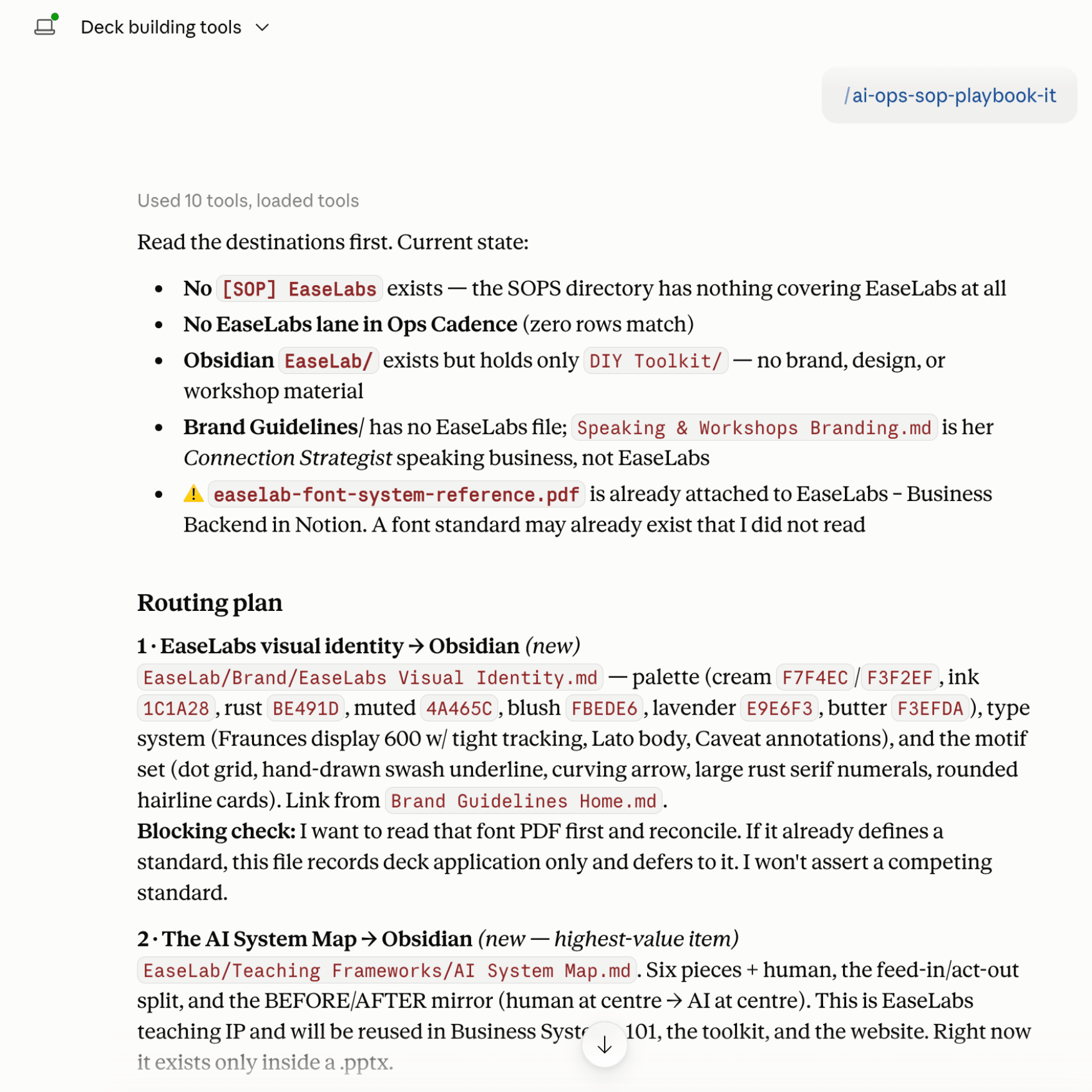
03Then it routes every decision to a specific place, with a reason. It flags the one judgment call it wants me on, and it states plainly what it is not doing and why. Nothing gets invented. Nothing gets quietly filed in the wrong drawer.
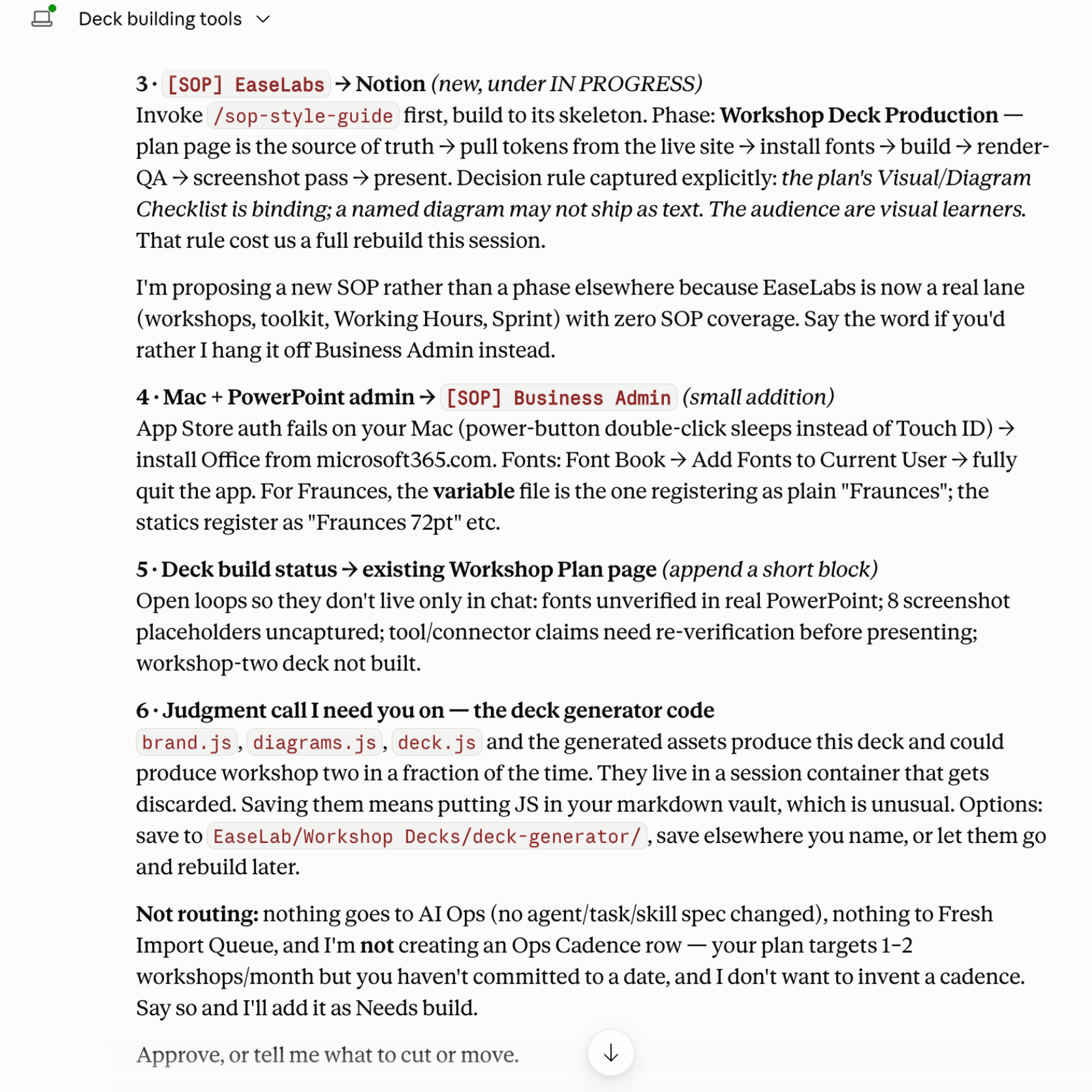
04I type one word. approve — and it writes all of it into my knowledge base and my SOPs (on other runs it also updates skills, scheduled tasks, and the ops cadence.) The next time I build a deck, I do not re-explain a single choice I made in this session. It is already written down where my AI will look.
why this matters
Every session teaches your AI something about how you work. Playbook It files it in the right place, so the next session starts further ahead than the last one. That is the compounding part, and it is the whole reason to bother.
None of it happens without the structure underneath it. A knowledge base your AI can read. SOPs it can write into. A profile that records how you are set up. That is exactly what the seven builders install, and it is why they come first.
after the build
What actually changes.
✓You stop re-explaining your business. Your AI reads your knowledge base and can find information you’ve previously dropped into a chat window.
✓The prompt that worked is still there next month. Because it became a skill instead of a chat.
✓Recurring work stops depending on your memory. The cadence board holds it and the dispatcher checks it.
✓You (and, more importantly, your AI) know where things go. New SOP, new context, new process. One right answer every time, and you decided it once.
✓You know when something drifted. Playbook It tells you, instead of you discovering it three months late.
This is the difference between using AI and having an AI system.
[TESTIMONIAL PLACEHOLDER — one strong quote, two to three sentences, ideally someone who finished the build path.]
[Name] [Role, one detail that proves they are real]
Most people use this as a starting point, not a finish line.
This toolkit is built for two kinds of people.
The first kind is self-sufficient. They understand the architecture, they want the assets, and they will figure out the rest. This is genuinely enough for them.
The second kind (honestly, most people) will set up the foundations here and then want help building their first real business system with someone who has done it before. That is what Working Hours and the 90-Day Sprint are for.
Working Hours are hands-on implementation time. We take what the toolkit installed and build one of your actual business systems together (using your real processes, your real tools, your real standards). The 90-Day Sprint is five hours of that, packaged together for momentum across several systems instead of just one. Both of them start from this toolkit, so the price of both includes it. If you already own it, you pay $147 less.
Every hands-on option builds on what this toolkit installs, so the toolkit comes with it. Working Hours are $650 and the 90-Day Sprint is $1,250, toolkit included. If you already own it, you pay $500 and $1,100.
not sure which lane you’re in? start here. give it a try. you’ll know after the first two builders if you need help.
Hi. I’m Alex.

I build business systems and AI workflows for founders who care about quality.
200+ podcast episodes · 3 newsletter issues per week · 30+ social posts per week · regular media appearances · 1 published book
I am not an operations person or an AI engineer. I am a business owner who ran out of other options. It turned out I was good at this. Good enough that an AI founder asked me to set up the AI systems behind her own company.
I run a podcast, a newsletter, a membership, a book, and a consulting practice. At some point I stopped being able to hold all of it in my head. So I started using AI — not to automate everything, not to hand my business to a fleet of agents, but to figure out how to actually keep up with my ambitions.
Everything in this toolkit is how I run my business right now. Forty-plus processes are running on this exact architecture. I built it because I needed it to work, and I kept refining it until it did.
What I teach is not theory. It is the system I use every single day: the basics of AI systems so you can build your own workflows, your own way, without lowering the bar on the work you put out.
If we haven’t met yet, you can find me on Instagram · Podcast · Substack · Newsletter
Still not sure this will work for you?
“I’m not technical.”Good. Neither is the toolkit. You are not writing code, you are answering questions about your own business out loud while your AI does the building. If you can describe how you currently do a task (or do the task in an AI window), you can run every builder in here.
“I already use Notion. I don’t need another system.”This is not another system. It builds using the tools you already use as much as possible. It will only suggest a new tool if you truly have a gap in tools for what it needs.
“Can’t I just ask my AI to do this?” You can. This took me about 6 months to build out. I’m offering to you has a proven structure that has already been tested by multiple users in different fields, with different businesses. What the builders carry is the order, the boundaries, and the decisions I have already made wrong once.
“I don’t have time for a whole setup weekend.”You do not need one. Start Here is about twenty minutes. The minimum useful system is three builders. The rest can wait until you want them.
“Should I take AI Systems 101 first?”It helps. 101 teaches the overall concepts and architecture, this builds the structures in your computer. Plenty of people buy this without it, but if knowledge bases, cadence and skills are new words to you, I’d suggest starting with AI Systems so you have a basic understanding of what you are installing and then come back here to get the builders.
The architecture is already done.
The folder structure, the file conventions, the order of operations, the parameters, the edge cases. I spent six months figuring all of that out so you don’t have to. You just need to understand the basics: you’re writing to a few consistent places, and Playbook It keeps it current after every session.
That’s the whole maintenance plan.
And because everything lives in plain files on your computer, this system is platform agnostic. Switch from Claude to ChatGPT. Try a new tool next year. Your knowledge base, your SOPs, your skills are just files. They come with you.
The EaseLab DIY Toolkit.
Everything you need to install your AI operating system:
✓Seven AI-guided builders, run in your own tools
✓Start Here installer and your my-systems.md profile
✓Knowledge Base, SOP, Ops Cadence, Ops Dispatcher, Playbook It and Skill builders
✓Delivered via Notion page (Notion Account not required) with a walkthrough for every builder
✓Show-don’t-tell material: my real vault, a real SOP, a real corpus load
✓Lifetime access and all future updates
$147 — one-time purchase
No subscription. No seats. No login. Files you keep.
If this saves you twenty minutes a week of re-explaining your business, it pays for itself before the end of the month.
And it just compounds from there.
the actual promise
Your AI wants to remember how you work. It wants to track what matters, update what’s changed, and start the next session already knowing what happened in the last one. It just needs somewhere to write it down.
That’s all this toolkit does — it sets up the locations: your knowledge base, your SOPs, your skills.
After that, one command at the end of a working session. Playbook It reads what happened, decides what’s worth keeping, and writes it to the right place. You don’t manage it. You just work the way you normally do, then let AI write down what matters.
Do that consistently and in a few months you have a system that built itself — session by session, without you having to think about it.
That’s the compound effect. And it starts the first time you run it.
No magic buttons. Just your system, built by you, maintained by AI.
You already know how your business works.
You have the processes. You have the standards. You have the context, all of it, in your head. The gap has never been knowledge. It is that none of it is written anywhere your AI can read, which means you are the one holding it, every day, forever.
That is exactly what the EaseLab DIY Toolkit was built for.
What people did with it.
These aren’t just happy customers, they’re people who finished the build path and can point at what they own now.
[TESTIMONIAL PLACEHOLDER — prioritise a quote that names a specific thing they built, not general praise.]
[Name] [Role]
[TESTIMONIAL PLACEHOLDER — prioritise a quote that names a specific thing they built, not general praise.]
[Name] [Role]
[TESTIMONIAL PLACEHOLDER — prioritise a quote that names a specific thing they built, not general praise.]
[Name] [Role]
Right now you’re the one holding all of it — every day, in your head, forever. The DIY Toolkit gives your AI somewhere to hold it instead.
And you stop being the operating system.
Stop holding it all yourself.
You don’t need to be more disciplined. You don’t need a better prompt. You don’t need to understand AI more deeply than you already do. You need the system built, once, in your own tools, by you.
everyone starts here
One-time payment. Lifetime access. 14-day guarantee.
© Easelab 2026 | All Rights Reserved | Get in Touch | Legal